Information for Speakers
For Oral Presenters
Please prepare your presentation slides in the language designated in advance.
Make sure to stand by on the front left side of the session room at least 10 minutes prior to your presentation.
A monitor, keyboard, and mouse are available on the podium, so please control the slides by yourself.
The same applies if you bring your own PC.
Please make sure to check in at the PC Center prior to your session, whether you bring your data or your own PC.
The details regarding the PC Center are as follows.
Location: Foyer, 5th Floor, Main Building, Keio Plaza Hotel
Opening Hours: Saturday, July 4, 7:50 AM – 6:30 PM
Sunday, July 5, 7:30 AM – 4:00 PM
1) Presentation Time
The time allocation varies depending on the session. Please refer to the information available in advance.
Please make sure to adhere strictly to the presentation time to ensure smooth progress of the session.
There is a time indicator on the podium; a yellow lamp will light up 1 minute before the end of the presentation, and a red lamp will light up when the presentation time is over.
2) Guidelines for Preparing Presentation Slides
- Please prepare the presentation slides with Microsoft PowerPoint.
- The session room is equipped with Windows PCs.
- We recommend you use the size 16:9 slides for the presentation.
- Please use the standard fonts provided by the OS.
- Please save your file using the format: "PresentationNumber_Presenter'sFullName.pptx"
- Please do not use Presenter View.
- For those who require a presentation script, please print out and bring your script at the time of the presentation.
- If you plan to use videos or a Macintosh, we strongly recommend you bring your own PC.
- Please register your presentation data at the PC Center at least 30 minutes before the start of your session.
- Please refrain from making any changes to your data at the PC Center.
- Make sure to submit your final data at the PC Center.
3) For those who bring the Presentation Data
- Please bring your data in a USB flash drive.
- Please save only the presentation data in your USB flash drive.
- Make sure to scan your USB flash drive with antivirus software prior to checking in at the PC Center to prevent virus infections.
- At the PC Center, the final presentation data will be checked if the data functions correctly on our PC.
- If the data contains a video or audio, please save all the data in the same folder.
- As for the video data, please ensure the data is compatible with standard Media Player. We recommend using the MP4 format.
- For backup and troubleshooting, please bring your own PC as well.
- The Meeting Secretariat is responsible for deleting all the presentation data after the conference.
4) For those who bring the PC
- Please check in with your PC at the PC Center at least 30 minutes prior to the session.
- After checking in and previewing your data at the PC Center, please bring your PC to the operator's desk located in the front left of the session room. The PC operator will return your PC after the presentation.
- Make sure to turn off the password, screen saver, and battery saver mode in advance.
- Presenters are required to bring AC adapter and external output connector.
*The connection port at the venue is HDMI. If you have a port other than HDMI, please make sure to bring the appropriate adapter or cable.
Disclosing the COI (Conflict of Interest)
All presenters at JAS2026 are required to disclose the COI (Conflict of Interest) status for the past three years at the time of the presentation.
Oral presentations should include the COI slide at the beginning, and poster presentations should present the COI information at the end of the poster.
【COI Disclosure Sample Slide(Format1-A)】
 Template: No COI to disclose Template: There is COI to disclose
For Poster Presenters
Please stand by in front of your poster panel 5 minutes before the session.
The allotted time is 7 minutes for presentation and 3 minutes for Q&A, total allotted time is 10minutes per presentation.
Please see below for the assigned time for your presentation.
| Set up | Viewing | Presentation | Removal | |
|---|---|---|---|---|
| Saturday, July 4 | 8:00AM - 9:00AM | 9:00AM - 4:10PM | 4:10PM – 5:10PM | 5:10PM – 6:00PM |
| Sunday, July 5 | 8:00AM - 9:00AM | 9:00AM – 1:00PM | 1:00PM – 1:50PM | 3:00PM – 3:50PM |
*Please note that the Meeting Secretariat will remove and discard the posters that remain after the removal time.
Guidelines for Preparing Poster Presentations
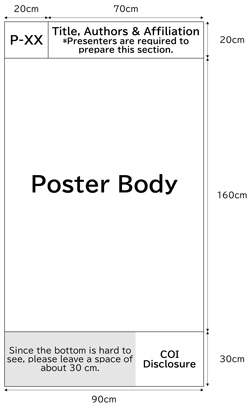
The size of the poster panel is 90cm (Width) x 210cm (Height).
The poster presentation number will be indicated in a 20cm x 20cm area in the upper left corner of the panel.
Please put up your poster on the panel of your presentation number.
Presenters are required to write the presentation title, presenter(s) name, and affiliation in the size of 70cm (Width) x 20cm (Height).
Please present the COI disclosure at the end of the presentation.
*There are no restrictions on font type.
*If the text extends all the way to the bottom of the board, it may be difficult to read, so we recommend leaving a space of about 30 cm at the bottom.